
How to Remove Line Breaks from LinkedIn & Social Media Posts
Your draft was clean in the document. The moment it hit the composer, every sentence broke into four short lines and the post reads like a ransom note. The wraps came with the copy — and here is how to take them out without losing the spacing that makes a post scannable.
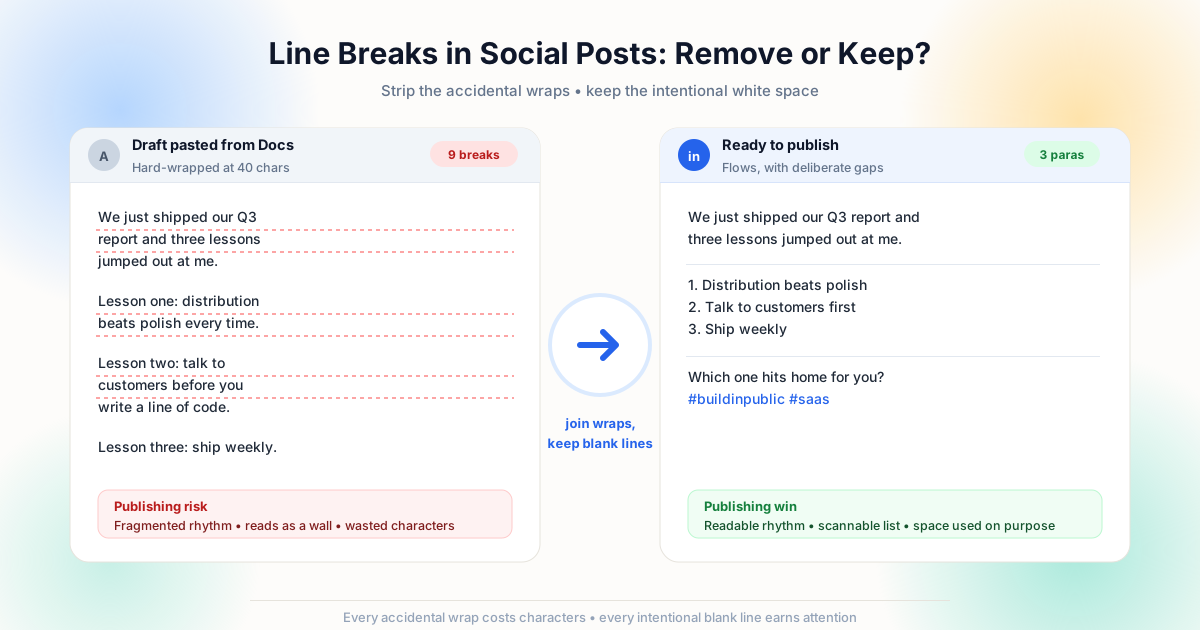
Where Social Post Line Breaks Come From
Social composers are honest mirrors: they publish exactly the characters you paste. The disorder arrives from wherever the draft was written.
Documents hard-wrap long paragraphs for the page. Word processors store a return at the end of every visual line you typed. AI tools frequently emit one fragment per line because that is how their output is structured. Chat apps preserve every manual break you pressed while composing. When any of that text reaches a post composer through the clipboard, each stored newline renders as a real line — and the composer has no way to know which ones you meant. The character doing all of this is the same newline discussed throughout this site; HTML renders its own break behavior through the br element and whitespace collapsing, which is why a page looks tidy even when its source is full of wraps.
That is also the distinction that makes this problem fixable. Text the screen wrapped for you holds no characters and cannot be pasted — it never existed. Text a writer or tool inserted as hard returns does exist, travels with the copy, and must be handled deliberately. Before cleaning anything, run the classification from our line breaks vs paragraph breaks article over your draft: which lines are accidental wraps, which breaks are intentional formatting.
Docs & Word
Line-wrapped paragraphs carry a return per visual line — the single biggest cause of fragmented posts.
AI drafts
Generated copy often arrives one sentence per line, sometimes with markdown noise attached to it.
Chat & DMs
Copying a conversation brings every Shift+Enter break — useful in chat, wrong in a post.
The clipboard
It copies characters, never layout — so what pastes in is what was stored, however it looked.
The Cleanup: Join Wraps, Keep the Rhythm
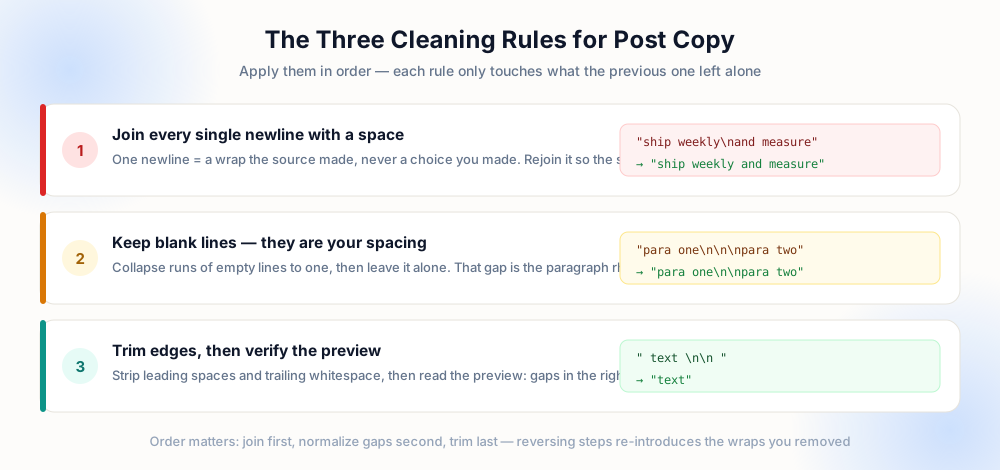
The goal is not a single line — it is a post with clean sentences and deliberate gaps. That means one operation for single newlines and a completely different treatment for blank lines: join the first with a space, preserve the second, and collapse any run of three or more empty lines down to one so the spacing stays intentional rather than inherited.
Paste the draft into a paragraph-safe cleaner, watch the preview, and copy the result. The join uses the same guarded logic every other guide on this site recommends: match a newline only when it is not adjacent to another one. What you get back is flowing prose with paragraph gaps intact — exactly what a feed renders best. The preserve paragraphs tool does this in one pass, and if your draft contains hard-wrapped bullet content instead of prose, the replace with space mode is the flatter option.
We just shipped our
Q3 report and three
lessons jumped out.

Lesson one: distribution
beats polish every time.

(9 wraps, awkward rhythm)
We just shipped our Q3
report and three lessons
jumped out.

Lesson one: distribution
beats polish every time.

(gaps kept, wraps gone)
Formatting Rules That Actually Help Readers
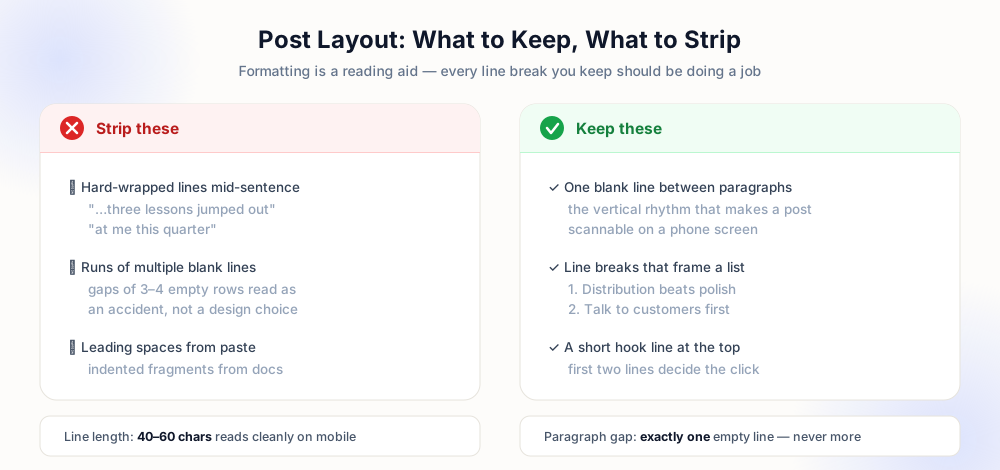
Once the accidental breaks are gone, every remaining line break should earn its place. The conventions below are not platform requirements — they are reading aids that survive any feed redesign, because they are based on how people scan text on a narrow screen.
| Element | Rule | Why it works |
|---|---|---|
| Hook line | Break after the first sentence | The opening lines decide whether anyone expands the post |
| Paragraph gap | Exactly one blank line | Vertical rhythm for scanning; more looks accidental |
| List items | One break per item | Numbered lines are parsed faster than inline commas |
| Line length | 40–60 characters | Matches phone width without mid-word breaks |
| Hashtags | Own line or final paragraph | Keeps the body copy visually separate from metadata |
| Trailing spaces | Never | Invisible characters waste count and break previews |
Character limits make the arithmetic concrete. Every accidental hard return plus its surrounding space consumes characters you could spend on substance — and when a draft must fit a strict count, wasted breaks are the first thing to reclaim. The same math applies to bios, event descriptions and comment replies: clean the text, then count. And if your workflow drafts copy in an assistant first, the prevention techniques in the AI text cleanup guide stop the wraps at generation time rather than at publish time.
Prevent the Problem at the Draft Stage
Cleaning every time you publish works, but removing the source of the breaks is better. Four habits cover nearly every case.
Draft in the destination. Writing directly in the composer means the text never acquires foreign wrapping in the first place — the breaks you press are the breaks that publish. Ask the AI for paragraphs. A prompt that requests flowing paragraphs instead of bullet fragments prevents the cleanup entirely, and the AI guide has the exact phrasing. Reflow before you paste. Run any document copy through the cleaner the moment you copy it — the habit described in the mobile cleanup workflow applies at the desk just as well. Keep a master draft. Store the approved version somewhere plain — a notes app or a plain-text file — so every future republish starts from clean characters instead of a re-pasted rendering.
Draft in-app
The composer becomes the source of truth — no foreign wrapping ever enters the text.
Prompt for paragraphs
"Write flowing paragraphs, no line breaks" at generation time removes cleanup at publish time.
Clean on copy
Run every document copy through the cleaner before it reaches a composer or a comment.
Master copy
Keep one plain-text version of approved posts so republishing never re-copies a rendering.
Reading Width Is Not the Character Count
Every composer enforces a character budget, and every reader consumes a narrow column — and the two measure completely different things. A post that sits comfortably under the limit can still read as a wall of text, while a post that spends characters on deliberate blank lines can feel like a series of punchy statements. The character counter tells you whether the post will be accepted; the preview on a phone tells you whether anyone will finish it.
Consider what a join actually reclaims. Each accidental return that is removed with a space costs nothing in the count — one newline character becomes one space — but it changes where the eye rests. A paragraph that was pasted as eleven short lines occupies eleven rows in the composer before cleanup and two or three rows after, so the same words now span fewer lines and the reader meets them as a block rather than a stack. That is the intended effect for prose. It is exactly the wrong effect for a list, where each item must still begin on its own row, which is why the cleanup must be told which breaks are wraps and which are content.
The working method is to clean first and read second. Paste the joined text, scroll the composer preview at the width of an actual phone, and only then decide whether any paragraph is too dense. If one is, insert a single deliberate blank line at the point where the argument turns — the composer renders it, the character cost is one character, and the rhythm you chose is preserved on every device. What never survives this process well is the opposite mistake: keeping every inherited wrap because it looked intentional in the source document. The replace with space tool performs the mechanical half in one pass, leaving the editorial half — where the breaks should actually be — to you.
When the Line Break Is the Content
Not every break is an accident, and the fastest way to ruin good copy is to flatten the ones that are not. Poetry posted as a text, a before-and-after story told in fragments, a short code snippet, a quote with its own line structure, an accessibility callout separated by a blank line — in each case the break carries meaning the sentence alone does not. The cleanup's job is to remove the wraps an editor or export added, not the ones the author pressed on purpose.
The distinction is mechanical rather than subjective. Accidental wraps almost always appear as many short lines of similar length with no blank lines between them, because they came from a fixed-width layout. Deliberate breaks appear as isolated returns between complete thoughts, or as blank lines that separate units the author wanted seen apart. Run the first pattern through a join and the prose opens up; run the second through the same join and a structured post becomes a paragraph nobody can scan. This is precisely the boundary the line breaks versus paragraph breaks article draws, and the same boundary the preserve paragraphs tool enforces automatically: single returns are joined, blank lines are kept.
The one-sentence version to keep is this: join the breaks that were caused by layout, keep the breaks that were chosen by the author. Applied consistently, that rule produces posts that read like they were written for the feed — because the layout-induced noise is gone and every remaining line break is a decision you made.
Pre-Publish Checklist
- No mid-sentence returns — every sentence in the preview flows across its full width.
- One blank line between paragraphs — spacing is consistent, not inherited from the source.
- Lists intact — items still start on their own line after the join.
- No leading spaces — paste artifacts from indented documents are trimmed.
- Character count verified — reclaimed breaks put characters back into the budget.
- Preview checked on mobile — the reading width most of your audience will use.
Frequently Asked Questions
How do I remove unwanted line breaks from a LinkedIn post?
Should I remove all line breaks from a post?
Why does my post look different after pasting?
How do I keep formatting across apps?
Do line breaks affect post performance?
Explore Related Tools & Tutorials
Clean Line Breaks from AI Text →
Generated drafts arrive line-fragmented — fix the output or change the prompt.
WritingRemove Line Breaks in Markdown →
When your post starts life as markdown — soft wraps, hard breaks and paragraphs.
ToolReplace Breaks with Spaces →
The flat cleanup for captions and bios where no paragraph structure exists.
EmailRemove Line Breaks from Email →
The same copy-paste problem in signatures, replies and campaign templates.