
How to Remove Line Breaks from Text on iPhone & Android (No App Needed)
You copy a paragraph on your phone, paste it into an email or a form, and the text arrives shredded into a dozen lines. The breaks were never yours to begin with — they came with the copy. Here is how to strip them in under a minute, on either platform, with nothing to install.
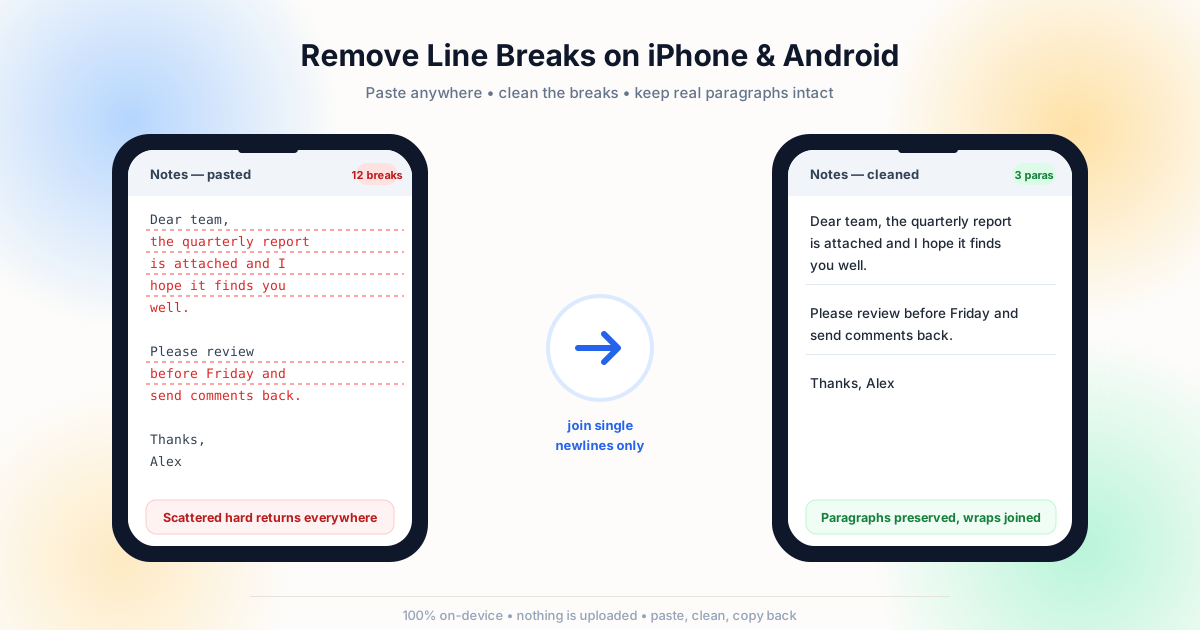
Why Copied Text Arrives Full of Line Breaks
The clipboard does not store what you saw — it stores what the source app sent. And what the source sent is almost always packed with newline characters you never typed.
A line break in plain text is a single control character, \n on iOS and Android alike. When a message, a web page, or a note was written, those characters were placed there by an editor, a template, a wrapped export, or a chat app that turns each visual line into a stored one. Copying takes the characters verbatim; pasting hands them to the next app, which dutifully renders every one of them as a new line. The newline character has no idea it is now inside your email signature or a form field that expected a single row.
The usual suspects on a phone are predictable. Notes apps keep hard returns because that is what a note is. Chat apps — WhatsApp, Messages, Discord — store each sent line exactly as composed, which is why the copy-paste problem described in our chat messages guide shows up on mobile too. Web pages hard-wrap long paragraphs for narrow viewports. PDFs are the worst offender of all: our explainer on broken PDF lines shows that the breaks are baked into the coordinate system of the file itself, so no amount of careful copying will avoid them.
Chat Apps
Every Shift+Enter line you or the sender pressed is stored and copied. Long messages arrive as a stack of one-liners.
Notes & Docs
Hard returns written for narrow phone screens follow the text into email, CRMs and forms that never wanted them.
Web Pages
Articles hard-wrapped at 60 characters copy their wrapping, not just their words — the break you never saw becomes real.
PDFs
Margin-based extraction splits every sentence at the page edge. Mobile PDF viewers copy the damage straight to the clipboard.
The 60-Second Fix That Works on Any Phone
There is no iOS-only trick and no Android-only trick — the fix is identical on both, because the problem is identical on both. Open a line-break remover in your phone's browser, paste the text, review the preview, and copy the cleaned result back. The tool runs locally in the page, which means the text is processed in browser memory and never transmitted anywhere: the same clipboard behavior Google documents for Android applies on iOS as well.
The important detail is which breaks get removed. A paragraph-aware cleaner joins single newlines inside a paragraph and leaves empty lines alone, so a three-paragraph note stays three paragraphs. The blanket approach — replacing every newline with a space — collapses everything into one block. The distinction between those two operations is the whole subject of our line breaks vs paragraph breaks article, and it matters more on a phone, where you usually cannot inspect the result before it is gone.
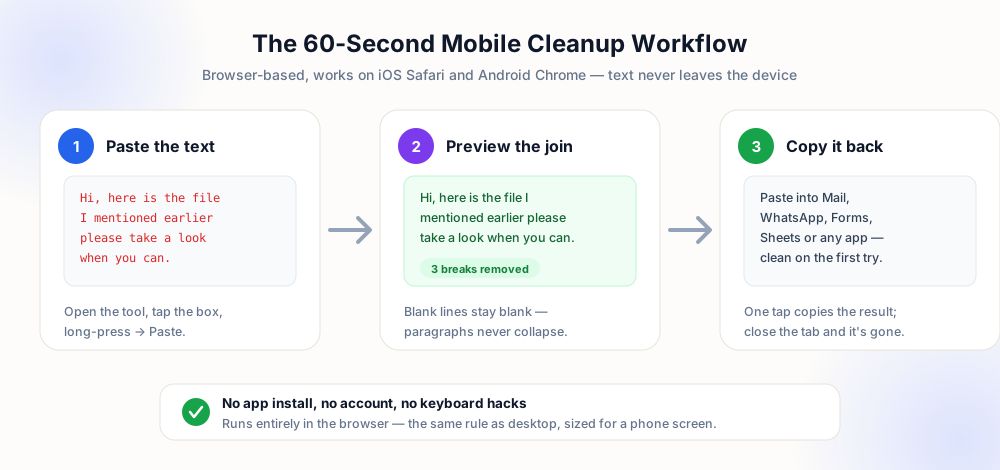
A few practical notes for the mobile flow. Use the browser rather than a keyboard extension: extensions request full-access permissions to everything you type, while a browser tab needs nothing and forgets everything when closed. Keep the preview on — on a small screen it is the only place you can confirm that a blank line survived. And if the destination app re-wraps your text visually after pasting, that is the app doing its job; visual wrapping is not a line break and will not survive a copy into a spreadsheet or database field.
iOS and Android: What Actually Differs
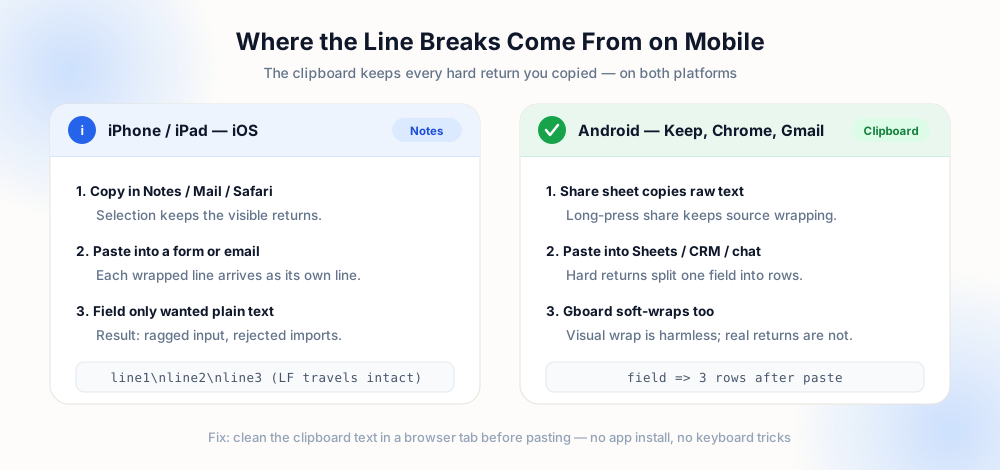
The cleanup step is the same, but the way breaks get into your clipboard differs slightly by platform — worth knowing so you can predict where the problem starts.
On iPhone, the share sheet and the copy command preserve the source characters exactly; iOS does not rewrap or normalize text on copy. The place iOS users get surprised is autofill and QuickType, which can insert a template containing returns — a saved signature or a canned reply is a frequent hidden source. On Android, long-press share behaves the same, but keyboard apps vary: some default to a soft newline for Enter inside single-line fields, others insert a hard one. The Apple copy and paste guide and the Google support page above both describe the same underlying model: the clipboard is a character stream, and everything in it goes along for the ride.
To: [email protected]

Dear team,
I am writing
to apply for
the role posted
yesterday.

5 hard returns
survive the paste
To: [email protected]

Dear team, I am writing
to apply for the role
posted yesterday.

1 blank line kept,
0 hard returns left
Clean Right Before You Paste Into These Apps
The destination decides how punishing a stray newline is. In a chat bubble it is harmless; in a data field it can split one record into three. Clean immediately before the paste, not earlier — the clipboard does not care how carefully you prepared it an hour ago.
| Destination | Damage from breaks | Cleanup mode |
|---|---|---|
| Email body | Reads as intentional short lines | Paragraph-safe join |
| Web form / signup | Field validation fails or truncates | Remove all breaks |
| Spreadsheet cell | Row height balloons; CSV export breaks | Remove all breaks |
| CRM record | One contact becomes fragmented notes | Paragraph-safe join |
| Code / JSON field | Payload invalid or silently misparsed | Escape, do not strip |
| Bio / caption | Character limits hit early, layout odd | Replace with space |
Notice the last row: on social platforms you sometimes want breaks. The reverse problem — keeping deliberate breaks while removing accidental ones — is exactly what our LinkedIn and social posts guide covers, and cell-level cleanup for spreadsheet destinations is detailed in the Excel and Google Sheets guide.
Prevent the Breaks Before They Reach the Clipboard
Cleanup is the repair; prevention is the cure. Four habits remove most of the problem at the source.
Compose in a plain field first. If you are drafting a message you will paste somewhere formal, type it in a single-line input or the destination itself rather than in a note — no hard returns exist to copy. Re-flow long text in the cleaner before the destination. Paste into the tool once, copy the joined version, and the destination receives flowing text instead of a stack of lines. Watch for double returns. A single blank line between paragraphs is structure; three blank lines in a row are noise from a source app that appended its own spacing — collapse runs of blank lines to one before you go on. And for data entry, sanitize before import: names and addresses pasted from a phone frequently carry a break inside the value itself, which our names and addresses guide shows how to detect field by field.
Draft plain
Write short-form text in the destination or a single-line field so no hard return is created in the first place.
Join first
Run the clipboard through a cleaner the moment you copy, then paste the clean version wherever it is destined.
Collapse gaps
Reduce runs of blank lines to a single separator so paragraph structure stays predictable after every paste.
Verify preview
Read the preview before copying back — gaps mean paragraphs survived, solid block means everything was joined.
The Characters Cleanup on a Phone Cannot Show You
Newlines are only the visible half of mobile paste damage. The clipboard also carries characters that no preview can display: non-breaking spaces inserted by keyboards that reward a double space, zero-width joiners and variation selectors wrapped around emoji, directional marks from right-to-left input, and soft hyphens copied out of a PDF. None of these is a line break, so a join correctly leaves them alone — and they surface later as gaps that refuse to collapse, search queries that never match, or a contact name that sorts into the wrong place in an address book.
Arithmetic catches most of that damage without any special tooling. When breaks are joined with a space, the character count stays constant, because one newline becomes one space. When breaks are deleted outright, the count falls by exactly one per break removed. The visible word count must not move in either mode, because no word boundary is created or destroyed. If those numbers disagree, the text contained something other than line endings — and the usual suspects are the invisible characters listed above, not an error in the tool you used.
The practical sequence on a phone is therefore two passes. First remove the line breaks with the mode that matches the destination. Then normalise whatever whitespace remains: collapse repeated spaces, convert non-breaking spaces to ordinary ones, and trim the leading indentation that note apps love to preserve from the source. Documents that travelled through a PDF need the extra hyphen-repair step explained in the why PDF text has broken lines article, and pasted records need the leading-space rules from the names and addresses guide.
The destination matters as much as the cleanup. A message field accepts a single line, a note accepts paragraphs, a form input silently truncates at the first break it cannot render. Check the target before you choose the mode, keep deliberate blank lines when the app will honour them, and strip everything when it will not. The preserve paragraphs tool runs entirely in the phone browser — no upload, no account — and leaves the paragraph structure intact while it removes the wraps you did not mean to keep.
Mobile Copy Checklist
- Know your source — chat, note, web page or PDF each injects breaks differently, and the PDF case needs the extra hyphen-repair pass from the PDF cleanup guide.
- Choose the mode by destination — prose keeps paragraphs, data fields lose every break, social captions keep deliberate ones.
- Check the preview on screen — it is your only confirmation before the destination app takes over.
- Copy back, then re-read the destination — the paste is done when the target app renders one clean block per paragraph.
- Close the tab — client-side tools hold nothing after the page unloads; there is no history to clear.
Frequently Asked Questions
How do I remove line breaks from text on my iPhone?
Can I do this on Android without installing an app?
Why does copied text keep its line breaks?
What is the difference between a visual wrap and a line break?
Will this destroy the paragraphs in my text?
Explore Related Tools & Tutorials
Remove Line Breaks from Chat Messages →
WhatsApp, Slack and Discord copies carry every Shift+Enter — flatten them once.
Data EntryClean Names & Addresses →
Hidden breaks inside pasted values are the classic mobile data-entry failure.
ToolPreserve Paragraphs Cleaner →
The paragraph-safe join with a live preview — works in any mobile browser.
ConceptsLine Breaks vs Paragraph Breaks →
Why one newline is safe to delete and the other is load-bearing structure.