
How to Remove Line Breaks in Python: Strings, Files, pandas & CSV
Python gives you a one-liner for every newline problem — as long as you pick the right one. This guide covers literal replacement, regex cleanup, splitlines idiom, pandas column cleaning, and CSV-safe flattening, with the trade-offs that matter in production code.
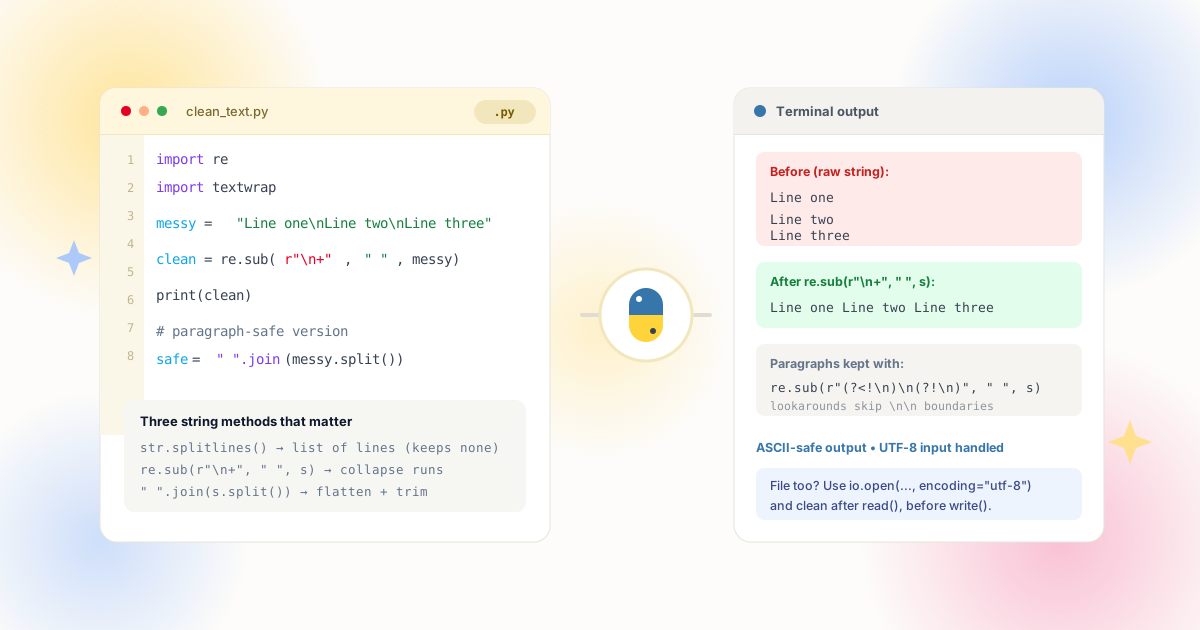
The Core One-Liner
Most Python newline cleanup is a single method call. The only real decisions are whether the break becomes a space or vanishes, and whether your input contains one newline flavor or several.
Python strings carry newlines as the literal escape \n (a single character, line feed). Windows files add \r\n (carriage return + line feed), and legacy text may contain a bare \r. The standard string type exposes these directly, so the two most common operations are:
| Goal | Code | Result |
|---|---|---|
| Breaks become spaces | text.replace('\n', ' ') | Words stay separated — the safe default |
| Breaks deleted | text.replace('\n', '') | Zero-width join — can fuse words |
| Windows + Unix input | text.replace('\r\n', '\n').replace('\r', '\n') | Normalizes every flavor to \n first |
| Collapse break + indent | re.sub(r'[ \t]*\n[ \t]*', ' ', text) | No double spaces from wrapped lines |
Choose the space variant by default. Deleting newlines outright merges the last word of one line with the first word of the next — the same class of bug we warn about in the CSV cleanup guide. Only use the empty-string variant when the newlines are pure formatting artifacts with no word boundaries around them, such as hyphen-free soft wraps you have already validated.
Raw Text & Logs
Multi-line log records and pasted text blocks — join records for search indexes or flatten before sending to a single-line field.
CSV & Exports
Spreadsheet exports where Alt+Enter formatting rode along — parsed with the csv module, flattened, and re-emitted with quoting intact.
pandas DataFrames
Column-wide cleaning with vectorized .str methods — no Python-level loops, no apply overhead on millions of rows.
API Payloads
User-generated content crossing into systems with single-line constraints — databases, search analyzers, CSV uploads.
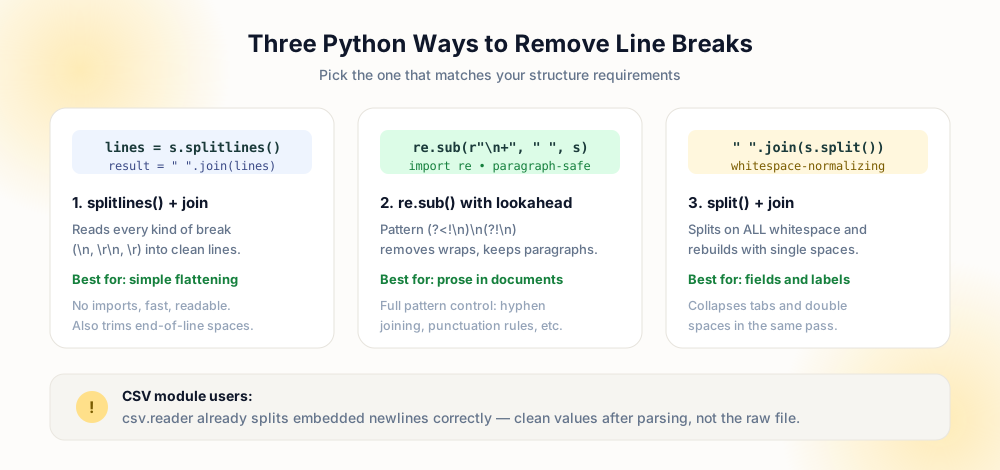
Regex Cleanup with re.sub
When newlines arrive with surrounding whitespace — indentation, trailing spaces, blank separator lines — literal replacement leaves a mess of double spaces behind. The re module handles the whole pattern at once:
Call at noon
    tomorrow if
possible

→ "Call at noon tomorrow if possible"Call at noon
tomorrow if
possible
→ "Call at noon tomorrow if possible"The workhorse patterns, in order of how often you will reach for them:
- Collapse newline + surrounding whitespace:
re.sub(r'\s*\n\s*', ' ', text)— turns any wrapped block into single-spaced prose. The safest general-purpose pattern for human-written text. - Remove all newlines only:
re.sub(r'\r?\n', ' ', text)— handles Unix and Windows endings without touching other whitespace. - Preserve paragraph structure:
re.sub(r'\n+', '\n', text)— collapses soft wraps but keeps single blank-line separation. Pair it with the preserve-paragraphs tool when you want the same behavior without code. - Strip line breaks at string edges only:
text.strip()often suffices — many "newline problems" are just trailing newlines from file reads.
Compile once when a pattern runs in a loop — re.compile(r'\s*\n\s*') outside the hot path is measurably faster than passing the pattern string every call. For the full taxonomy of break types (soft wraps, hard returns, paragraph gaps), see line breaks vs paragraph breaks.
The splitlines Idiom
When you already think in lines — deduplicating, renumbering, filtering — str.splitlines() followed by a join is the clearest expression of intent:
'\n'.join(text.splitlines()) removes every line break and its quirks in one readable expression. Unlike split('\n'), splitlines understands all Unicode line boundaries and never leaves a trailing empty element. Join with a space instead of a newline to flatten prose, or join with nothing only when lines are guaranteed character continuations (base64 chunks, wrapped numbers).
A common production pattern keeps paragraphs while dropping wraps: split into lines, group lines until you hit an empty one, then join each group with spaces. That is precisely what our preserve-paragraphs tool does — useful for checking expected output before writing the script yourself.
pandas Column Cleaning
For tabular data, vectorized string methods beat Python loops by orders of magnitude. The equivalent operations on a DataFrame column:
| Task | Expression | Notes |
|---|---|---|
| Replace newline with space | df['c'].str.replace('\n', ' ', regex=False) | literal=False — fastest for single characters |
| Collapse newline + spaces | df['c'].str.replace(r'\s+', ' ', regex=True) | normalizes repeated whitespace in one pass |
| Trim line edges | df['c'].str.strip() | removes leading/trailing newlines after reads |
| All object columns | df.select_dtypes('object').apply(...) | apply the same .str call across the frame |
Set regex=False when replacing a literal character — it avoids regex compilation and eliminates surprises if data contains regex metacharacters. Read CSVs with keep_default_na and dtype control as usual, clean, then write with to_csv(index=False); pandas quotes embedded newlines automatically unless you disable quoting.
Files, CSVs, and Streaming
Whole-file cleanup is three lines with pathlib — read, transform, write:
Path('in.txt').write_text(Path('in.txt').read_text().replace('\n', ' ')) — always pass encoding='utf-8' explicitly rather than relying on platform defaults, which differ between Windows and Linux hosts. For files too large for memory, iterate lines and write incrementally: the newline you are removing is the line separator the iterator already consumed, so you decide the replacement as you join.
CSV files deserve the csv module rather than blind string replacement — reading a file line by line would split any quoted field that legitimately contains a newline. Parse rows, flatten the specific fields you care about, and re-emit with the writer; quoting stays RFC 4180-compliant automatically. The decision framework for which fields to flatten is covered in depth in the CSV data fields guide, and the broader batching story in batch remove line breaks.
raw = open('in.csv').read()
out = raw.replace('\n', ' ')
# splits quoted fields, fuses rowswith open('in.csv', newline='') as f:
rows = list(csv.reader(f))
rows = [[c.replace('\n', ' ') for c in r] for r in rows]
# structure preserved, fields flattenedComplete Recipe: A Reusable flatten() Helper
The pieces above combine into one function worth keeping in your utilities module. It normalizes every line-ending flavor, collapses newlines together with surrounding indentation, and gives you a paragraph-preserving mode when blanks lines carry meaning:
import re

_NL = re.compile(r'[ \t]*\r?\n[ \t]*')
_PARA = re.compile(r'(\r?\n){2,}')

def flatten(text, keep_paragraphs=False):
    text = text.replace('\r\n', '\n').replace('\r', '\n')
    if keep_paragraphs:
        text = _PARA.sub('\n\n', text)
        text = '\n'.join(line.strip() for line in text.split('\n'))
        return text
    return _NL.sub(' ', text).strip()
Walk through what each line buys you. The first replace folds Windows and legacy Mac endings into plain \n, so the compiled patterns only ever match one flavor — this is the normalization step that prevents half-cleaned files. The _NL pattern then consumes indentation on both sides of the break, which is why the result has single spaces instead of the double-space artifacts a naive replace leaves behind. In paragraph mode, consecutive breaks collapse to exactly two first — protecting blank-line boundaries — before each remaining line is trimmed, so a document keeps its structure while soft wraps disappear.
Compile the patterns at module level rather than inside the function: compilation happens once at import time instead of on every call, which matters when the helper runs across a table of millions of cells. The function returns a new string and mutates nothing, so it drops directly into a pandas apply or a list comprehension over parsed CSV rows. For file-level use, pair it with pathlib — read with an explicit encoding, pass the text through flatten, write back — and you have the entire pipeline described earlier in this guide in four lines.
Two extensions cover the remaining cases. For stripping only leading and trailing breaks — the classic symptom of reading a file whose last line already ends with a newline — skip the function entirely and call text.strip(). For stricter word-boundary cleanup, swap the _NL substitution for re.sub(r'\s+', ' ', text), which also folds tabs and repeated spaces between words; useful for search-index preparation, wrong for preserving intentional indentation. The decision tree mirrors the modes in our line breaks vs paragraph breaks article — know which break you are targeting before you compile the pattern.
Before shipping any of this into a pipeline, pin the behavior with a few assertions: a Windows-ending sample, a paragraph-separated sample, and one string where a newline sits between two words. Three test cases catch nearly every regression that newline cleanup code invites — a flipped replacement argument, a pattern that accidentally matches twice, or normalization silently running after the transform instead of before it. Treat the helper as infrastructure: once it is tested, every future cleanup task becomes a one-line import rather than another copy-pasted replace.
Production Checklist
- Normalize line endings first — convert
\r\nand bare\rto\nso one pattern covers everything. - Join with a space unless you have proven no word boundary sits at the break — fused words are silent data corruption.
- Use regex=False for literal replaces in pandas — faster and immune to metacharacters in your data.
- Parse CSVs with the csv module or pandas — never line-oriented string replacement on quoted files.
- Set encoding explicitly on every read_text and open call — platform defaults will eventually bite you.
- Preserve paragraphs intentionally — if blank lines carry meaning, use the
\n+collapse instead of total flattening.
Frequently Asked Questions
How do I remove line breaks from a string in Python?
text.replace('\n', ' ') to convert breaks into spaces, or text.replace('\n', '') to delete them. For mixed endings, normalize with text.replace('\r\n', '\n') first, or use re.sub(r'\s*\n\s*', ' ', text) to also collapse surrounding indentation and avoid double spaces.What is the difference between splitlines() and split('\n')?
splitlines() splits on every Unicode line boundary — \n, \r\n, \r, \v, \f — and removes them cleanly. split('\n') matches only the literal newline, leaving \r characters behind from Windows files and producing empty strings at consecutive breaks. Prefer '\n'.join(text.splitlines()) when rebuilding.How do I remove line breaks from a pandas column?
df['col'].str.replace('\n', ' ', regex=False) for literal replacement, or .str.replace(r'\s+', ' ', regex=True) to collapse newlines and repeated spaces together. Both are vectorized and fast on millions of rows; wrap in df.select_dtypes('object').apply(...) to clean every text column at once.Should I remove line breaks when writing CSV files?
How do I remove line breaks from a file in Python?
Path('file.txt').read_text(encoding='utf-8'), transform using replace, re.sub, or splitlines-join, then write back with write_text(cleaned, encoding='utf-8'). For large files, stream with a loop over the file object instead of loading everything into memory.Explore Related Tools & Tutorials
Remove Line Breaks from CSV & Data Fields →
RFC 4180 rules, quoting, and which fields are safe to flatten.
GuideBatch Remove Line Breaks →
Shell and script workflows for processing many files at once.
ConceptsLine Breaks vs Paragraph Breaks →
Know which break your regex should target — and which to keep.
ToolRemove All Line Breaks →
Test the exact transformation before you hard-code it in a script.
ProgrammingRemove Line Breaks in Java →
The same recipes with String.replace, replaceAll and streaming readers.