
How to Remove Line Breaks in YAML: Folded (>), Literal (|) & Multiline Strings
YAML is the foundational configuration language of modern cloud infrastructure — from Kubernetes manifests and Helm charts to GitHub Actions and Docker Compose. Yet its multiline string and newline rules remain one of the most frustrating sources of deployment bugs.
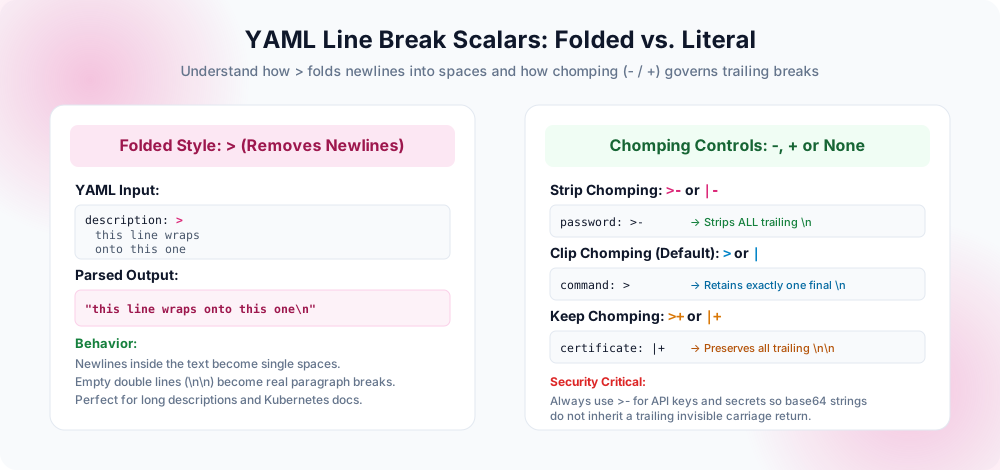
>) converts newlines into spaces; the literal indicator (|) preserves them; and chomping modifiers (-, +) govern end-of-block linefeeds.Why Line Breaks Cause Hidden Nightmares in YAML
In JSON or XML, strings are explicitly delimited by double quotes or tags. In YAML, however, whitespace and indentation define structure. This design makes YAML wonderfully human-readable for configuration, but it creates enormous ambiguity when strings span multiple lines.
Every DevOps engineer has encountered deployment failures stemming from newline mishandling in YAML:
- Kubernetes Secrets Authentication Failures: You base64-encode an API token, paste it into a Secret manifest, and the pod fails to authenticate. Why? A hidden newline at the end of the YAML scalar was encoded into the secret payload, corrupting the token signature.
- Broken GitHub Actions Scripts: A multi-line
run:step executes each line as a disconnected shell statement instead of a single chained command, causing step failures or unexpected script exits. - Docker Compose Environment Variable Pollution: A database connection string wrapped across two lines injects an invisible
\nin the middle of a password, triggering instant connection refusal.
To control newlines in YAML, you must understand the two primary block scalar styles — Folded (>) and Literal (|) — along with the three Chomping Indicators (-, +, or default).
Folded Style (>)
Replaces newlines within the text block with single spaces. Blank lines become real paragraph breaks.
description: >Folded Strip (>-)
Folds newlines into spaces AND strips any trailing newline at the end of the string. Perfect for long commands.
command: >-Literal Style (|)
Preserves every newline and indentation level exactly as authored. Used for scripts, certificates, and multi-line keys.
script: |Literal Strip (|-)
Preserves inner newlines between lines, but strips any final trailing newline byte from the end of the block.
cert: |-1. The Folded Scalar (>): How to Remove Line Breaks Automatically
The folded scalar indicator (>) is specifically designed to allow developers to format long prose, documentation, and descriptions cleanly within the 80-character or 100-character line limit of their code editors without inserting physical line breaks into the parsed application data.
Example: How Folded YAML Parses
Consider this YAML snippet:
summary: >
  This is line one of the summary.
  This is line two, written on a new line in the file.

  This is a new paragraph after an empty line.
When a YAML parser reads this block, it applies the following transformation rules:
- The newline between line 1 and line 2 is removed and replaced with a single space.
- The blank line between line 2 and line 3 is recognized as a genuine paragraph break, so it is preserved as a single newline (
\n). - The resulting parsed JSON value is:
"This is line one of the summary. This is line two, written on a new line in the file.\nThis is a new paragraph after an empty line.\n"
2. Chomping Indicators: Strip (-), Clip (default), and Keep (+)
While the folded (>) or literal (|) character dictates how internal line breaks are treated, the chomping indicator dictates what happens to the final trailing line break at the bottom of the block.
| Operator | Name | Trailing Newline Behavior | Best Used For |
|---|---|---|---|
| >- or |- | Strip | Completely removes all trailing newlines (0 newlines at end) | Tokens, Passwords, Bash commands, single-line env vars |
| > or | | Clip (Default) | Retains exactly one trailing newline (\n) | Standard configuration files, prose, documentation |
| >+ or |+ | Keep | Preserves every trailing blank line at the bottom of the block | PEM certificates, fixed-format text protocols |
3. Real-World Cloud & DevOps Recipes
Recipe A: Breaking Long Shell Commands in GitHub Actions
In GitHub Actions workflow YAML files, a run: step formatted with | executes line by line. But if you want to write a single long command with multiple flags across several lines for readability, use >-:
# GitHub Actions: Single command spread across lines
- name: Deploy to Production
  run: >-
    docker run -d
    --name web-app
    -p 8080:80
    --env ENVIRONMENT=production
    my-registry.io/app:v1.2.0
Because >- strips newlines and trailing returns, the runner executes the entire block as one single continuous shell command:
docker run -d --name web-app -p 8080:80 --env ENVIRONMENT=production my-registry.io/app:v1.2.0
Recipe B: Kubernetes ConfigMaps and Secrets
In Kubernetes manifests, injecting an unintended trailing newline into a secret causes base64 decoding errors:
apiVersion: v1
kind: Secret
metadata:
  name: database-credentials
type: Opaque
stringData:
  # Using >- guarantees no trailing newline is attached to the secret string!
  DB_PASSWORD: >-
    SuperSecretPasswordWithoutTrailingNewline
4. Programmatic Line Break Removal in YAML
Using the yq Command-Line Tool
yq (the jq equivalent for YAML) allows you to strip or replace line breaks in YAML fields directly in CI/CD pipelines:
# Replace line breaks in a specific YAML field with single spaces
yq eval '.spec.description |= sub("\n+", " ")' manifest.yaml > clean.yaml

# Flatten all string items in an array
yq eval '.items[] |= sub("\r?\n", " ")' list.yaml
Using Python (PyYAML) Safely
When cleaning YAML programmatically in Python, avoid string-level replace operations on the raw file text, which can destroy indentation. Always parse first:
import yaml

# Load YAML safely into a Python dictionary
with open('config.yaml', 'r') as f:
    data = yaml.safe_load(f)

# Clean specific string values
if 'description' in data:
    data['description'] = ' '.join(data['description'].splitlines())

# Dump back to clean YAML
with open('cleaned_config.yaml', 'w') as f:
    yaml.dump(data, f, default_flow_style=False)
YAML Line Break Pre-Deployment Checklist
- Block Indicator Chosen Intentionally: Verified whether you need
>(to remove line breaks) or|(to preserve line breaks). - Chomping Strip Added for Secrets: Applied
>-or|-to API keys, passwords, and tokens to prevent trailing\ncorruption. - Indentation Aligned: Checked that all continuation lines inside the multiline block are consistently indented beyond the parent key.
- No Tab Characters: Ensured that only spaces (never ASCII tabs) are used for indentation, as tabs violate the YAML specification and trigger immediate parse errors.
- Validated via Linter: Ran
yamllintor parsed the file withyqor Python to confirm structural validity before committing to Git.
Frequently Asked Questions
What is the difference between > and | in YAML?
>) removes newlines inside the block and replaces them with spaces (except for blank lines, which become paragraphs). The literal symbol (|) preserves all newlines exactly as written.What does >- mean in YAML?
>- is the Folded Strip scalar. It replaces all internal newlines with spaces and strips any trailing line break from the end of the text. It is the optimal style for single-line shell commands and secrets.Why do newlines in Kubernetes Secrets cause bugs?
How do I write a long single-line command in GitHub Actions across multiple lines?
run: >-. This allows you to indent sub-commands and flags across multiple visual lines; the runner parses the block into a single space-separated line with no trailing return.Can I escape newlines with backslashes in YAML?
"..."), placing a backslash at the end of a line instructs the YAML parser to continue the string on the next line without inserting any space or newline.Explore Related Tools & Tutorials
JSON Line Break Handling →
Learn how JSON differs from YAML in newline parsing, escaping, and compacting.
Command LineLinux & Bash Stream Tools →
Use tr, sed, and awk in CI/CD pipelines to clean payloads before generating YAML.
ExplainersLine Breaks vs. Paragraph Breaks →
Understand the foundational mechanics of single line feeds versus double paragraph breaks.
Online ToolRemove All Line Breaks →
Strip returns from tokens and secrets in your browser before adding them to your YAML file.