
How to Remove Line Breaks in LaTeX, BibTeX & Academic Paper Citations
Researchers, graduate students, and scientists spend countless hours copying abstracts from IEEE Xplore, ScienceDirect, and Google Scholar into Overleaf and BibTeX files. Here is the step-by-step methodology to eliminate artificial line breaks, repair split hyphens, and ensure flawless PDF compilation.
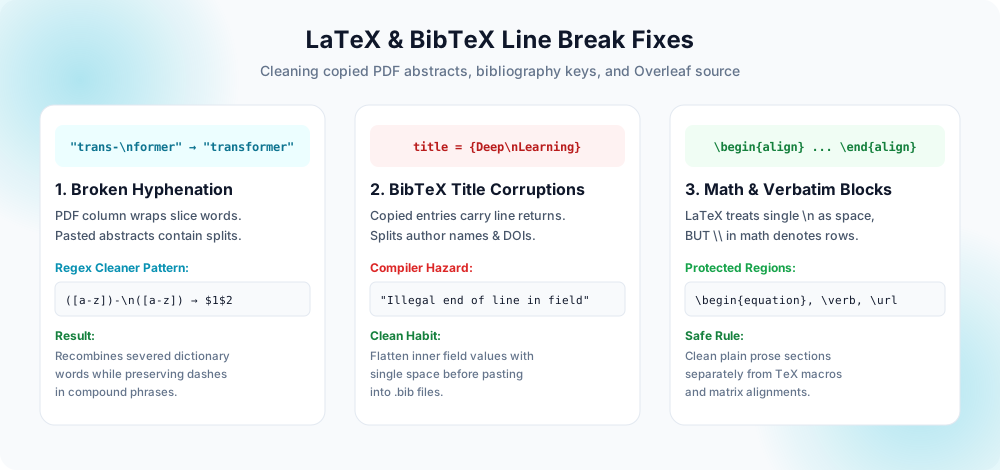
The Anatomy of the Academic Copy-Paste Dilemma
If you have ever copied an abstract or a literature review excerpt from a published journal paper into Overleaf, you have experienced the visual wreckage of broken margins and fragmented sentences.
Academic publications from publishers like IEEE, Springer, Elsevier, Nature, and ACM are traditionally formatted into strict two-column layouts. When rendered into PDF documents, the rendering engine does not store words as flowing paragraphs. As explained in our deep architectural dive on why text copied from PDF has broken lines, the PDF specification positions glyphs using absolute 2D coordinate matrices on the printed canvas.
When your operating system clipboard extracts text from a PDF column, it reconstructs the layout by placing a physical hard return (\n or \r\n) at the right edge of each column line. The resulting text looks like this:
Recent advances in trans-
former architectures have dem-
onstrated unprecedented perfor-
mance across natural language
and computer vision domains.
Recent advances in transformer
architectures have demonstrated
unprecedented performance across
natural language and computer
vision domains.
Notice the two major defects in the copied version:
- Every line has a hard break: Even though LaTeX naturally collapses single newlines into spaces during prose rendering, having hundreds of ragged lines inside your
.texsource makes version control diffs (Git) impossible to read and paragraph editing intolerable. - Severed Hyphenation Artifacts: Words split by the typesetter's hyphenation algorithm (e.g.,
"trans-\nformer"or"dem-\nonstrated") remain broken. If pasted directly, LaTeX treatstrans-andformeras two distinct words connected by an explicit hyphen!
Split Hyphens
Two-column PDF justification inserts hyphens at column boundaries that corrupt technical terms when copied.
([a-z])-(\r?\n)([a-z]) → $1$2Corrupted .bib Files
Embedded newlines in title, author, or doi fields trigger compilation crashes in BibTeX / Biber.
title = {Deep\nLearning}Broken DOIs & Links
Newlines inside \url{...} or \href commands inject percent-encoded linefeeds, creating 404 dead links.
\doi{10.1145/\n1234567}Equation Protection
Line breaks in align, gather, and matrix blocks must NOT be deleted without checking for \\ rows.
\begin{align} a &= b \\ c &= d1. Repairing Split Hyphenation Artifacts in Copied Abstracts
The most destructive artifact of copying academic PDFs is the soft hyphen converted into a hard character. When a word like "optimization" is split across two lines as "opti-" and "mization", standard newline removal simply turns it into "opti- mization" or "opti-mization". Both are severe spelling and grammatical errors that undermine the credibility of your paper.
The Two-Step Regex Repair Pattern
In any text editor (such as VS Code, Sublime Text, or Overleaf), run this regular expression substitution before removing other line breaks:
Step 1: Recombine broken words
Find:    ([a-zA-Z])-(\r?\n)+([a-zA-Z])
Replace: $1$3

Step 2: Remove remaining soft line breaks with space
Find:    (?<!\n)\n(?!\n)
Replace:  (a single space)
Let us understand what Step 1 accomplishes:
([a-zA-Z])captures the letter immediately preceding the trailing hyphen.-(\r?\n)+matches the hyphen and the following newline character(s).([a-zA-Z])captures the initial letter of the remainder of the word on the next line.$1$3replaces the entire sequence with only the first letter and the third letter, completely obliterating the hyphen and stitching the word back together.
2. How Line Breaks Sabotage BibTeX (.bib) Databases
BibTeX bibliography management is notoriously sensitive to whitespace and newline formatting. When researchers copy citation metadata from publisher portals or Google Scholar, embedded newlines frequently contaminate bibliographic fields.
The Common BibTeX Hazards
- Split DOI Links:
@article{smith2024,
  author = {Smith, John and Doe, Jane},
  title = {Scalable Deep Learning in Robotics},
  doi = {10.1109/
         TRO.2024.1234567}
}
When BibTeX formats this citation, the embedded newline and 9 leading space characters are injected into the hyperref link. Clicking the citation in the generated PDF attempts to openhttps://doi.org/10.1109/%20%20%20%20%20%20%20%20%20TRO.2024.1234567, returning an immediate HTTP 404 error. - Title Field Corruption: When titles wrap across lines, some older BibTeX and Biber parsers fail with:
I was expecting a ',' or a '}' --- line 42 of file references.bib
Flattening the title value into a single horizontal string resolves the parser confusion instantly. - Author Delimiters: In BibTeX, authors must be separated by the literal word
and(e.g.,Smith, John and Doe, Jane). When citations are copied from websites where authors were formatted as a vertical list, missing spaces between names and newlines can cause the parser to merge two separate researchers into a single fictitious author!
3. Cleaning Copied Text Directly in Overleaf
Overleaf is the premier cloud-based LaTeX collaborative editor. If you are working on a conference submission or journal revision in Overleaf, you can perform safe newline cleanup without leaving the browser:
Step-by-Step Overleaf Workflow
- Select the pasted abstract or text paragraph in your Overleaf document.
- Press Ctrl + F (or Cmd + F on Mac) to open the Overleaf search toolbar.
- Click the gear icon or toggle button on the search bar to reveal the Replace field.
- Click the Regex toggle (the
.*icon) to enable regular expression matching. - In the Find box, enter:
(?<!\n)\n(?!\n). - In the Replace box, enter a single space.
- Click Replace iteratively or select the range to clean up the section without disturbing document preamble commands.
main.tex file in Overleaf! A global replace will destroy line breaks after \usepackage{...}, \section{...}, and comments starting with %. Always apply line break removal only to highlighted blocks of prose or inside dedicated .bib files.4. Protecting Mathematical Equations and Verbatim Blocks
One critical nuance distinguishing LaTeX from Markdown or Word is that line breaks carry distinct mathematical and syntactical roles depending on the active environment:
| LaTeX Environment | Role of Single \n | Role of Double \n\n | Safety Guidance |
|---|---|---|---|
| Standard Body Prose | Treated as a space | Creates new paragraph (\par) | Safe to join lines with space |
| \begin{verbatim} / lstlisting | Literal line break | Literal blank line | DO NOT REMOVE (Destroys code) |
| \begin{align} / matrix | Ignored (\\ denotes rows) | SYNTAX ERROR! | Never insert empty lines in math |
| BibTeX Fields | Folded into space | May trigger parse warning | Flatten to single horizontal line |
Academic Pre-Submission Checklist
- Repaired Split Hyphens First: Run the regex pattern
([a-zA-Z])-(\r?\n)+([a-zA-Z])to stitch fractured words before performing general line joining. - Protected Code Listings & Verbatim Blocks: Verify that no automated find-and-replace touched algorithm blocks, pseudo-code, or verbatim environment source lines.
- Sanitized BibTeX DOIs: Checked
references.bibfor split URL or DOI fields to avoid generating broken links in camera-ready submissions. - Preserved Paragraph Breaks: Ensured that double blank lines between distinct literature arguments were not accidentally collapsed into a single massive wall of text.
- Compiled Without Warnings: Run full compilation (pdflatex / xelatex + bibtex) and verify that no "Overfull \hbox" or "Underfull \hbox" warnings were created by malformed words.
Frequently Asked Questions
Why do copied PDF abstracts have line breaks on every line?
How do line breaks in BibTeX entries cause compiler errors?
doi or url fields insert percent-encoded spaces, resulting in broken external links.How do I fix split hyphenated words from copied papers?
([a-zA-Z])-(\r?\n)+([a-zA-Z]) and Replace with $1$3. This reconnects words severed by column margins while leaving compound terms intact.Does LaTeX automatically ignore single line breaks?
verbatim blocks, URLs, code listings, and BibTeX fields, hard returns are not ignored and can alter formatting or break compilation.Can I clean text online before pasting into Overleaf?
Explore Related Tools & Tutorials
Why PDF Text Has Broken Lines →
Learn about PostScript coordinates and why PDF viewers inject hard returns at margins.
GuidesClean Copied PDF Text →
Complete guide to removing page headers, footers, line numbers, and PDF artifacts.
WritingMarkdown Line Break Rules →
Understand soft wraps, two-space hard breaks, and pandoc conversion workflows.
Online ToolPDF Text Cleaner Tool →
Paste copied abstracts to stitch lines and remove broken hyphens in 1 click.